Posts

Showing posts from January, 2024

[Resource] New Implementation of MotionCtrl for ComfyUI has been realeased

Image
User  chaojie has released a new implementation of MotionCtrl for ComfyUI. Checkout their chaojie's Github page to download.

[Resource] ComfyUI 3D Pose Editor

Image
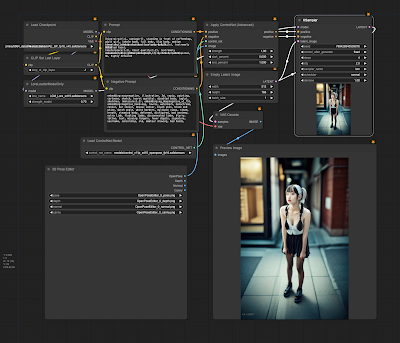
ComfyUI 3D Pose Editor is a new custom node for ComfyUI. Checkout the author's GitHub to download and use it with your ComfyUI.

[Resource] Pixel Power! ✨ u/aziib's Stable Diffusion Gems

Image
Retro art lovers, rejoice! u/aziib just dropped a pixel-perfect checkpoint & Lora for Stable Diffusion.  Craft Game Boy-worthy characters, landscapes, & objects – it's 8-bit magic! Download & join the pixel party! AziibPixelMix Checkpoint Game Boy Palette Style Lora You can discuss more here .

[News] Introducing PrimaPrompt's Image Degrader

Image
Author: alta007 The Stable Diffusion community received an exciting announcement from Reddit user u/primaprompt . They've unveiled the Image Degrader , a powerful tool now available on PrimaPrompt's website . Accessible to all, this user-friendly online tool lets you effortlessly enhance image realism in your browser. Simply upload an image, and within seconds, experience the magic of AI as it transforms your visuals into a more realistic rendition. User u/primaprompt is eager for user feedback and feature requests. Dive into this intuitive tool, contribute your thoughts, and witness the evolution of image enhancement. Explore the Image Degrader at PrimaPrompt Image Degrader and redefine the realism of your images today. You can discuss further in this thread .

[Tutorial] Unleash the Power of Stable Diffusion Locally with ComfyUI: A Step-by-Step Guide

Image
Author: suihou827 Ready to create mind-blowing art with Stable Diffusion from the comfort of your own computer? This comprehensive guide will walk you through the process, even if you're a beginner! Let's dive in: 1. Install 7zip: Grab 7zip, a free file archiver, from its official website: https://www.7-zip.org/ Double-click the downloaded file and follow the instructions to install it. 2. Set Up ComfyUI: Download the latest ComfyUI release for Windows from GitHub: https://github.com/comfyanonymous/ComfyUI/releases/download/latest/ComfyUI_windows_portable_nvidia_cu121_or_cpu.7z Right-click the .7z file, select "7-zip", and then "Extract here". Navigate to the extracted folder and run either "run_nvidia_gpu.bat" (for NVIDIA GPUs) or "run_cpu.bat" (for CPUs, slower). A URL will appear; copy and paste it into your web browser to open ComfyUI. 3. Download Checkpoints (Models): ComfyUI doesn't include checkpoints by default, so grab som...

[Tutorial] XeroGen: Generate High-Quality Prompts for Stable Diffusion, Midjourney, Dall-E, and Leonardo AI

Image
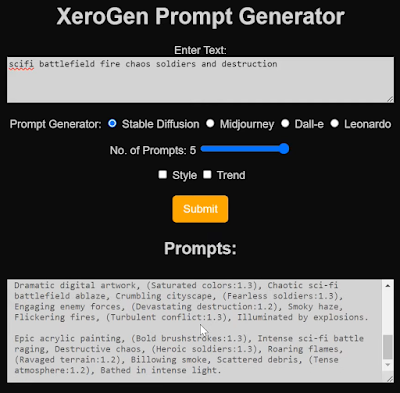
What is XeroGen? XeroGen  is a subscription-based platform that combines prompt generators for Stable Diffusion, Midjourney, Dall-E, and Leonardo AI into one. It helps you create high-quality prompts for these AI image generators quickly and easily, saving you time and effort. How does XeroGen work? Specify your desired image: Tell XeroGen what you want to generate, like "a cyberpunk cityscape" or "a portrait of a cat in a hat." Choose your AI image generator: Select the AI image generator you want to use, such as Stable Diffusion or Midjourney. Get prompts: XeroGen will generate several prompts based on your preferences. You can also specify the number of prompts you want (up to five). Fine-tune the prompts (optional): You can customize the prompts to your liking using the available sliders and options. Use the prompts in your AI image generator: Copy the prompts and paste them into your chosen AI image generator to create your artwork! Benefits of using XeroGen: S...

[News] AnimateAnyone AI: Makes Anyone a Dancing Star

Image
Want to see your grandma salsa or your cat moonwalk? Meet AnimateAnyone , an AI tool turning photos into short dance videos! But here's the twist: it's only on a Chinese app right now, and you need a China phone number . Why it's cool: Anyone can become a dancing star, no skills needed! Personalized entertainment: imagine your friends, family, or even historical figures grooving! Viral potential: grandma's tango could break the internet! How it works: Upload a photo (any will do!) Pick a dance style (hip-hop, salsa, even Bollywood!) AI works its magic and your photo dances! Keep an eye on AnimateAnyone and similar AI tools. One day, we might all be creating personalized dance videos, no China phone number needed (hopefully!). In the meantime, dream up your dance styles and who you'd love to see animated! And remember, even without dancing AI, you can still dance like nobody's watching! Source: Reddit

[News] Civitai: Call for feedback on sustainable community development

Image
Are you passionate about Stable Diffusion and the amazing AI art it unlocks? Then buckle up, Civitai needs your voice! This community-driven hub for Stable Diffusion models and content is reaching out for your feedback to ensure its sustainable future, and with it, the future of groundbreaking AI art creation. Civaitai's Options on the Table: Ads + Ad-free: Enjoy Civitai with the occasional ad, or pay for an uninterrupted experience, while creators earn from ad views. Paid Generation: Fuel your AI art creations with "Buzz" (Civaitai's engagement currency), directly rewarding creators for their model usage. Clubs: Connect with your favorite creators through exclusive content and interactions, but this feature may need your support to stay afloat. Paid Commercial Licenses: Unleash the potential of AI art commercially by empowering creators to set their own prices for model licensing. Nexus Mods Model: Borrow a proven approach from the gami...

[Tips] Microsoft's Copilot Unlocks Free Access to GPT-4 and DALL-E-3: What You Need to Know

Image
Microsoft has revolutionized AI accessibility by integrating GPT-4 and DALL-E-3 from OpenAI into Copilot. Users on Android, iOS, and Edge browser now enjoy free access to these cutting-edge AI models. Previously, accessing GPT-4 and DALL-E-3 often required payment, but with Microsoft's Copilot, this hurdle is eliminated. However, the duration of this free access remains uncertain. Microsoft might revisit this offering in the future, potentially altering the pricing structure. In summary, Microsoft's move democratizes AI technology, granting users unparalleled access to advanced capabilities without financial constraints. Yet, users should seize this opportunity while it lasts. Stay updated for further developments on this groundbreaking integration.

[Tutorial] Scenario AI: Create Consistent Characters

Image
  In this short tutorial, I will show you how to use Scenario AI, a new AI for quick and easy generating game assets. Software Scenario (free tier available) Photoshop  or Gimp (or any photo editing software) Magnific AI (optional) Pricing Scenario AI offers 4 pricing plans, including a free option, perfect for this tutorial. How to use Scenario AI Choose a model: Go to the Models tab in Scenario. Select a model that is in the vibe of the character you want to create. Don't worry about finding the perfect one yet, you can blend and remix later. Click "Generate with this model" to get a basic idea of the style. Prompt your character: Use the prompt box to describe your character, including details like age, hair color, clothing type, etc. Add prompts for front, side, and back views to ensure the model generates the character from multiple angles. Use the Prompt Builder or Prompt Spark features for inspiration if needed. Don't forget negative prompts to avoid unwanted e...

[Tutorial] Stable Diffusion For Absolute Beginner - Part 7/7

Image
Creating Large Prints with Stable Diffusion Go back to Part 6 Stable Diffusion primarily operates at a native resolution of 512×512 pixels for v1 models. It’s essential to maintain a balance in image dimensions. Avoid straying too far from 512 pixels in width and height to prevent duplicate subjects in your images. Here’s how to set the initial image size: For Landscape Images: Set the height to 512 pixels and increase the width, e.g., 768 pixels (2:3 aspect ratio). For Portrait Images: Set the width to 512 pixels and increase the height, e.g., 768 pixels (3:2 aspect ratio). Moving on, to make larger prints, you’ll need to upscale the image. The AUTOMATIC1111 GUI, a free tool, offers popular AI upscaling options. Mastering Image Composition Stable Diffusion technology continually evolves, offering various methods for image composition control: Image-to-Image Direct Stable Diffusion to follow an input image loosely. For instance, generating a dragon using an eagle input image retains th...