Fooocus, an innovative image generating software built upon Gradio, brings a fresh approach to Stable Diffusion and Midjourney's designs. It merges the best of both worlds, offering an offline, open-source, and free platform while eliminating the need for manual tweaking, allowing users to focus solely on prompts and images. One of Fooocus's standout features is its streamlined user experience. It incorporates numerous inner optimizations and quality improvements, relieving users of the burden of complex technical parameters. Instead, it fosters seamless interaction between humans and computers, making image generation an enjoyable endeavor. Installation of Fooocus has been simplified significantly. With just a few clicks between downloading the software and generating the first image, users can dive right into the creative process. The software demands minimal GPU memory (4GB Nvidia) and is readily available for Windows users. How to Get Started with Fooocus Downloading Fooocu...
In this short tutorial, I will show you how to use Scenario AI, a new AI for quick and easy generating game assets. Software Scenario (free tier available) Photoshop or Gimp (or any photo editing software) Magnific AI (optional) Pricing Scenario AI offers 4 pricing plans, including a free option, perfect for this tutorial. How to use Scenario AI Choose a model: Go to the Models tab in Scenario. Select a model that is in the vibe of the character you want to create. Don't worry about finding the perfect one yet, you can blend and remix later. Click "Generate with this model" to get a basic idea of the style. Prompt your character: Use the prompt box to describe your character, including details like age, hair color, clothing type, etc. Add prompts for front, side, and back views to ensure the model generates the character from multiple angles. Use the Prompt Builder or Prompt Spark features for inspiration if needed. Don't forget negative prompts to avoid unwanted e...
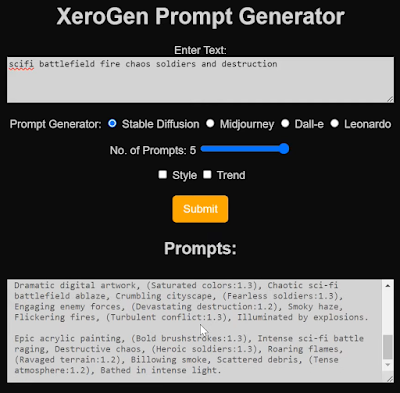
What is XeroGen? XeroGen is a subscription-based platform that combines prompt generators for Stable Diffusion, Midjourney, Dall-E, and Leonardo AI into one. It helps you create high-quality prompts for these AI image generators quickly and easily, saving you time and effort. How does XeroGen work? Specify your desired image: Tell XeroGen what you want to generate, like "a cyberpunk cityscape" or "a portrait of a cat in a hat." Choose your AI image generator: Select the AI image generator you want to use, such as Stable Diffusion or Midjourney. Get prompts: XeroGen will generate several prompts based on your preferences. You can also specify the number of prompts you want (up to five). Fine-tune the prompts (optional): You can customize the prompts to your liking using the available sliders and options. Use the prompts in your AI image generator: Copy the prompts and paste them into your chosen AI image generator to create your artwork! Benefits of using XeroGen: S...


Comments
Post a Comment
Leave your comment here...